tmathbird.com, technical communications.
T:
Email: info@tmathbird.com
Bridging the Gap Between Technical Writing and GenAI
Featured Posts
-

Empathetic approaches have many benefits
0 comments -
Empathetic approaches have many benefits
0 comments -
Knowledge bases face many challenges
0 comments -
Recent trends in technical communications
2 comments -
Our ever-changing relationship with technology
0 comments
Bridging the Gap Between Technical Writing and GenAI
AI is changing fast, and if you’re in tech comms, you may be wondering where that leaves you.
Anyone reading this article is well aware that AI, especially generative AI, is constantly reshaping the way we work. Developers are automating, marketers are prompting, and product teams are integrating. But what about the Tech Comms folk? If you're a technical communicator, tech writer/author, technical content developer or whichever title you prefer, you might have found yourself on a few occasions pondering what the future holds for tech comms folk. After all, GenAI can write, summarise, translate, and even chat to users. Is there a need for tech writers anymore?
Presently, the answer is a resounding 'Yes'. And I imagine it'll be the case for a good few years to come. Even more so as we adapt and redefine the role.
The Shift: From Writer to Knowledge Architect
GenAI often produces impressive content, but from a tech comms perspective, it can't automatically build a functional knowledge base on a company's products, services, APIs, etc., without first being taught. It still needs:
- Clear, well-structured documentation
- Semantic relationships between concepts
- Content broken into logical chunks
- Terminology, definitions, and constraints
It still needs the kind of information design and structured writing that tech comms folk are uniquely qualified to do.
The Opportunity: Connect Documentation to GenAI
I think there's a great opportunity here for technical communicators:
We're the bridge between usable documentation and intelligent AI systems.
Rather than competing with GenAI, we can teach it by building smart, structured, accessible documentation that becomes the foundation of intelligent support.
The Demo: Teaching AI to Read Your Docs
To explore this further, I built a small demo project that connects a knowledge base with an embedded AI chatbot (one that doesn’t just parrot the internet) but answers questions based on your docs.
I used free tools and ran it all locally.
- Knowledge base built with Docusaurus – FREE
- AI chatbot powered by Flowise – FREE standard subscription
- Embeddings via OpenAI – you'll need a few OpenAI credits. $5 worth is more than enough
- Vector storage with Pinecone – FREE standard subscription
You can also build your knowledge base with Jekyll, Hugo, MadCap Flare, etc. The important bit is the structure and the flow, and giving the AI something useful to work with.
How It Works
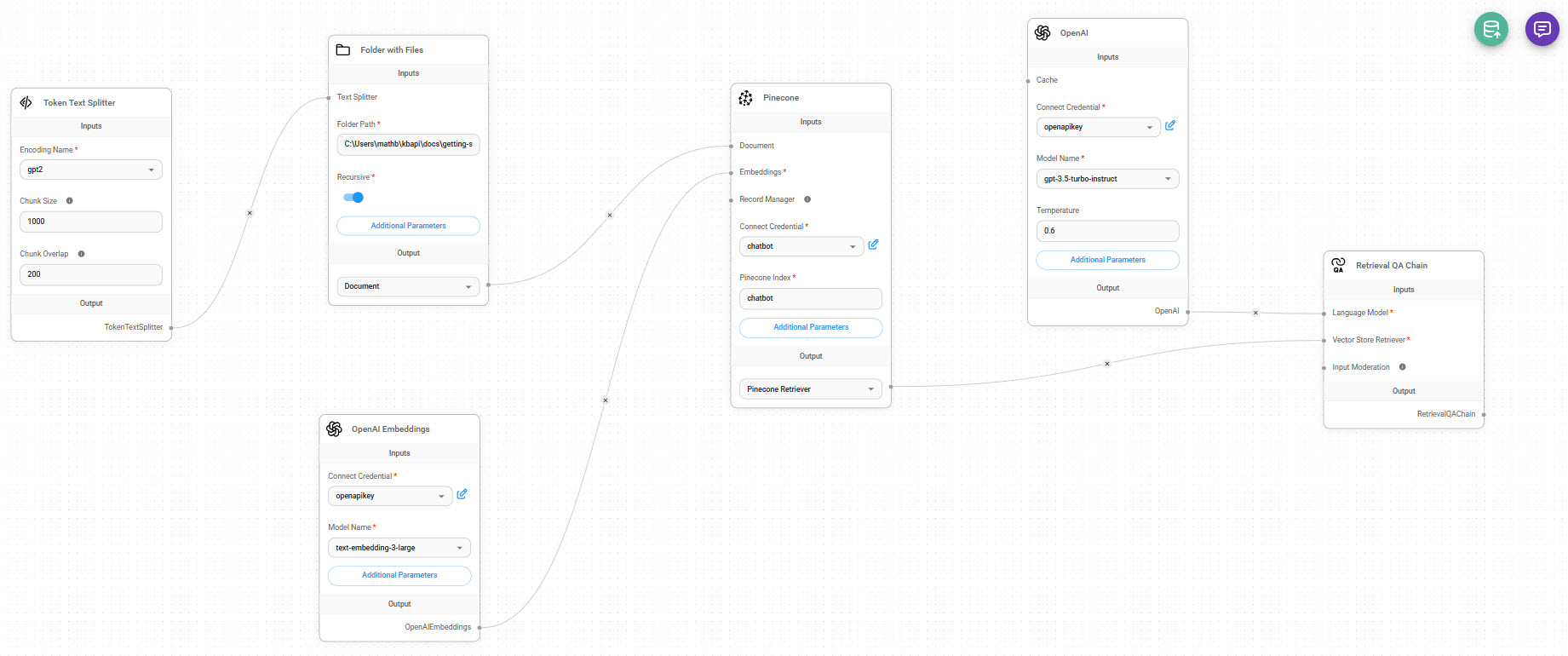
Token Text SplitterThis splits the markdown files into manageable chunks. I set:
- Chunk Size: 1000 tokens
- Overlap: 200 tokens
This ensures the model has enough context per chunk, and nothing important gets lost between them.
OpenAI EmbeddingsThis takes each chunk and turns it into vector data (numerical representations of meaning). I used:
- Model: text-embedding-3-large
- Credential: my openapikey
You could also use other providers, depending on your setup.
Pinecone (Vector Store)This stores the embedded vectors in a searchable index. I called my index chatbot. The key thing here is that the chatbot will later use this vector store to retrieve relevant content based on user questions.
OpenAI LLM (Chat Model)I used gpt-3.5-turbo-instruct with a temperature of 0.6 — enough to keep it conversational without going off-script. This model does the actual answering once it’s fed the context from Pinecone.
Retriever + Retrieval QA ChainThese connect the dots. The retriever queries Pinecone for relevant chunks, and the Retrieval QA Chain handles input moderation, question + context formatting, and response generation. The final output goes straight to the chatbot window.
Retrieval QA ChainConnects everything in a logic chain to return coherent responses.
Once this works successfully, and you've upserted the content into your vector store and tested it in the chatbot, you can then:
Embed your AI Chatbot into your Knowledge Base
Flowise gives you a number of embed options for the chatbot pop-up (for example: HTML, JavaScript, React, etc.). You just copy and paste the embed code and place it in the required file, such as index.html or, in the case of Docusaurus, index.js.
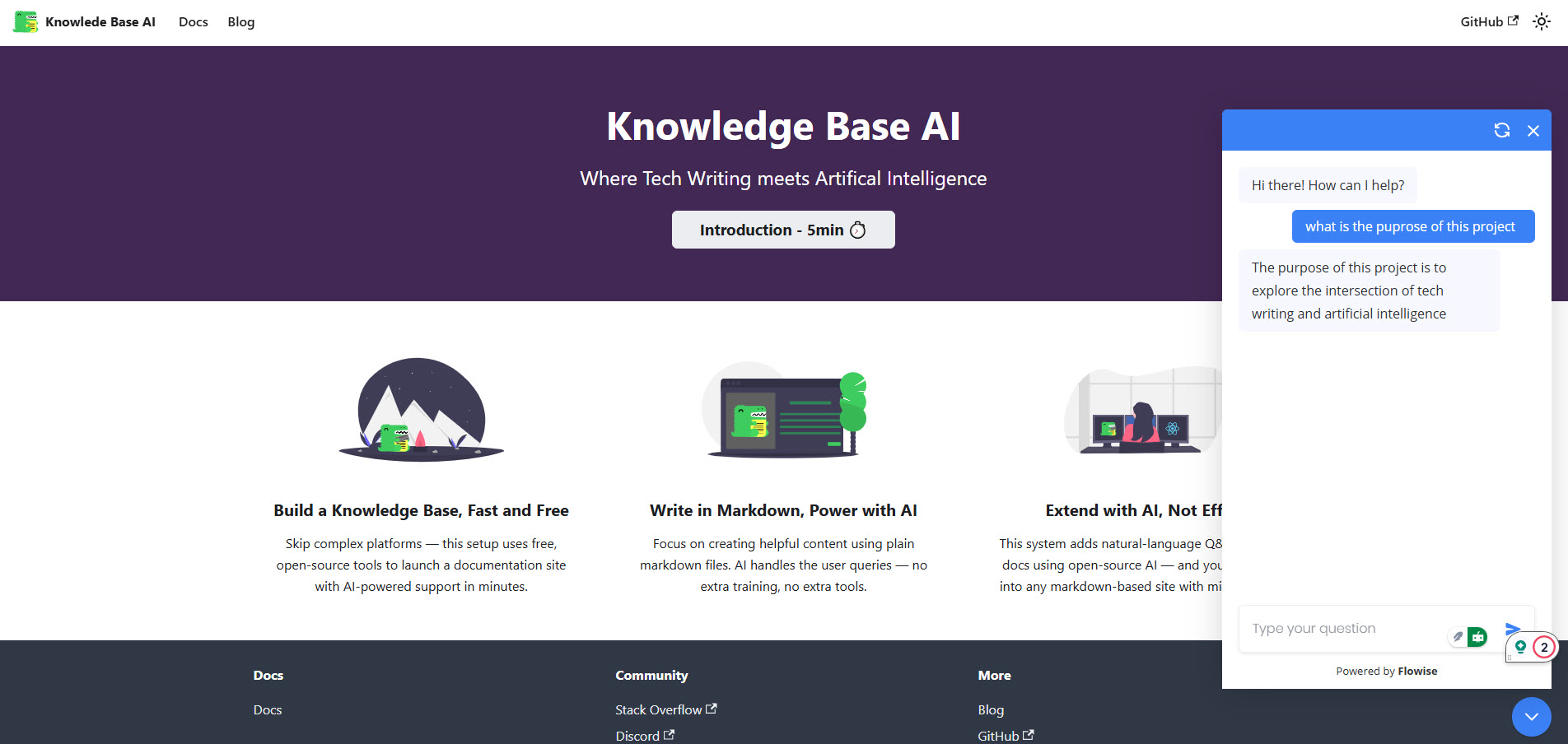
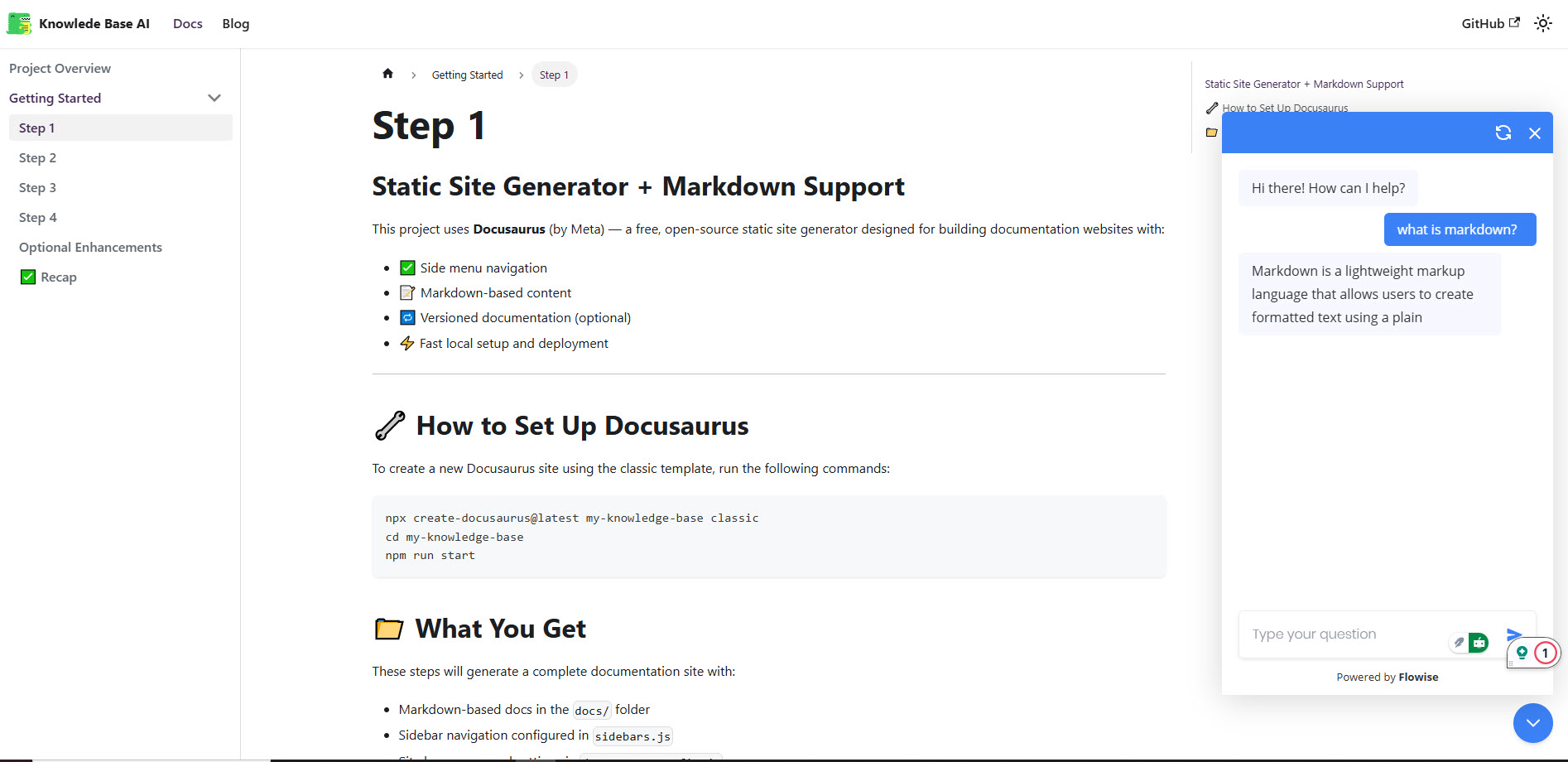
Now, when you visit the knowledge base, the chatbot floats in the corner, ready to answer questions based on the markdown content.
When asked, “What is the purpose of this project?”, it responds using the text it pulled directly from docs/introduction.md.
What Worked / What Didn’t
Pros- Free to build
- Works offline
- Fully customisable — I can tune every step
- Teaches the AI using real product docs
- Not quite plug-and-play, especially the embedding into Docusaurus; the JavaScript can be fiddly. The index.html approach is more straightforward, especially if you use a static site knowledge base.
- Pinecone DB dimension doesn't always match the OpenAI embedding, so ensure it's set to what the Pinecone dimension requires (for example, 1024) in the parameters section of the embedding node.
- Need some OpenAI credits (especially for embeddings)
- No fallback if the user’s question isn’t in your docs
Final Thoughts
This isn’t just a chatbot demo. It’s a proof of concept:
Tech comms isn’t going away. We’re becoming the interface layer between people, content, and AI.
We’re the ones who understand how content is structured, how people search, and how systems behave—and we’re uniquely placed to teach GenAI how to support users in the best way we can.